架构图示例
架构图帮助可视化系统设计和组件关系。
电商微服务架构
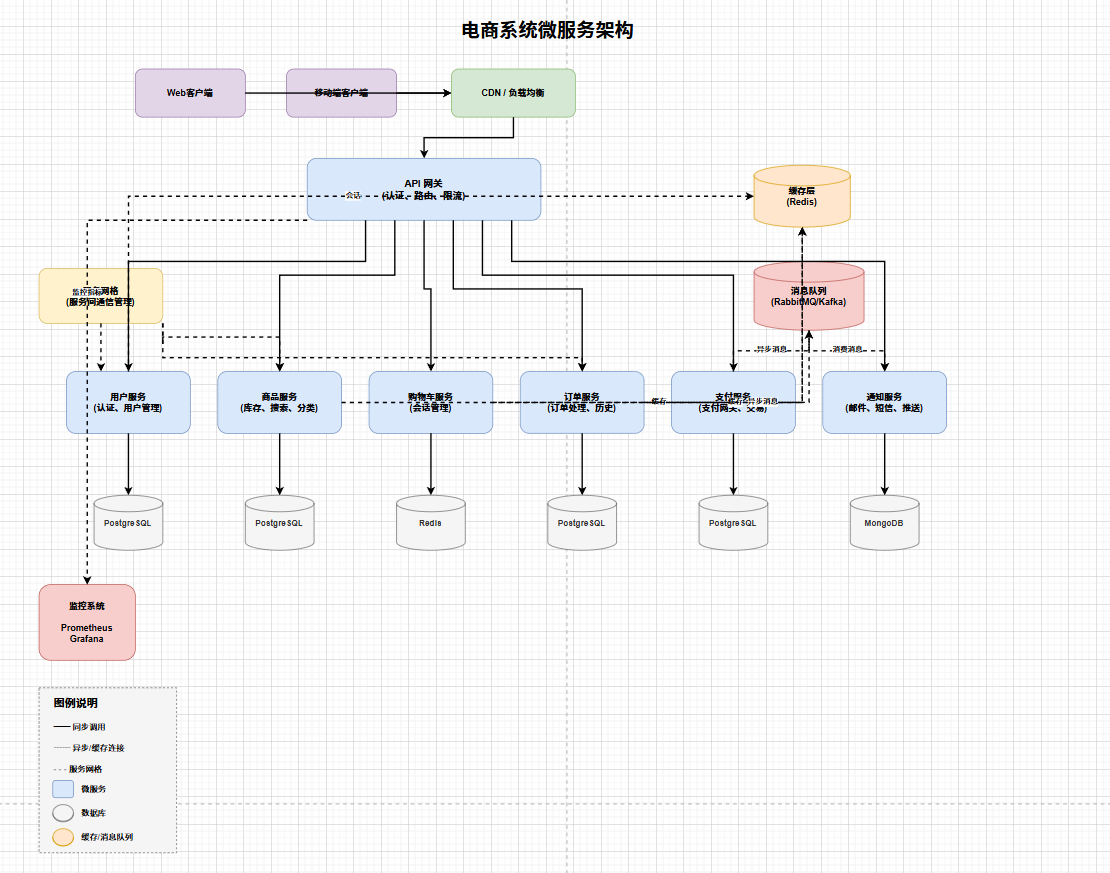
提示词:
设计一个电商系统微服务架构图,包含以下组件:

API 网关
├── 用户服务(认证、用户管理)
├── 商品服务(库存管理、商品搜索、分类)
├── 购物车服务(购物车管理、会话处理)
├── 订单服务(订单处理、订单历史)
├── 支付服务(支付网关、交易处理)
└── 通知服务(邮件、短信、推送通知)

基础设施:
- API 网关(所有请求的入口点)
- 服务网格(服务间通信管理)
- 消息队列(RabbitMQ/Kafka 用于异步事件)
- 缓存层(Redis 用于会话和商品缓存)
- 数据库(每个服务使用 PostgreSQL)
- CDN/负载均衡
- 监控(Prometheus、Grafana)
示例文件: https://github.com/bahayonghang/drawio-skills/blob/main/examples/ecommerce-microservices.drawio
架构层次:
- 客户端层:Web 和移动端客户端
- CDN/负载均衡层:流量分发
- API 网关层:认证、路由、限流
- 微服务层:6 个核心服务
- 用户服务(认证、用户管理)
- 商品服务(库存、搜索、分类)
- 购物车服务(会话管理)
- 订单服务(订单处理、历史)
- 支付服务(支付网关、交易)
- 通知服务(邮件、短信、推送)
- 基础设施层:
- 服务网格(服务间通信)
- 消息队列(异步事件)
- 缓存层(Redis)
- 数据层:每个服务独立数据库
- 监控层:Prometheus + Grafana
核心设计原则:
- ✅ KISS(简单至上):清晰的分层架构
- ✅ SOLID:服务独立,各自拥有数据库
- ✅ DRY(避免重复):异步消息队列复用事件处理
- ✅ 可观测性:全面的监控和日志
连接类型:
- 实线(━━):同步调用
- 虚线(┄┄):异步/缓存连接
- 点划线(- - -):服务网格连接
应用场景:
- 电商平台架构设计
- 微服务系统设计
- 云原生应用规划
- 服务网格实施
- 事件驱动架构
AWS 无服务器架构
Prompt:
Generate an AWS architecture diagram with Lambda, API Gateway, DynamoDB,
and S3 for a serverless REST API. Use AWS icons.
Components:
- API Gateway (entry point)
- Lambda functions (business logic)
- DynamoDB (database)
- S3 (file storage)
- CloudWatch (monitoring)
Use Cases:
- Serverless application design
- API architecture documentation
- Cloud migration planning
GCP Microservices
Prompt:
Generate a GCP architecture diagram with Cloud Run, Cloud SQL, and
Cloud Storage for a web application. Use GCP icons.
Components:
- Cloud Run (containerized services)
- Cloud SQL (managed database)
- Cloud Storage (object storage)
- Cloud Load Balancing
- Cloud Monitoring
Use Cases:
- Microservices architecture
- Container-based deployments
- GCP infrastructure planning
Azure Web Application
Prompt:
Generate an Azure architecture diagram with App Service, SQL Database,
and Blob Storage. Use Azure icons.
Components:
- App Service (web hosting)
- SQL Database (relational data)
- Blob Storage (files and media)
- Application Insights (monitoring)
- Azure CDN (content delivery)
Use Cases:
- Web application architecture
- Azure deployment planning
- Enterprise application design
Tips for Architecture Diagrams
Use Official Icons
Always mention the cloud provider and request official icons:
- "Use AWS icons"
- "Use GCP icons"
- "Use Azure icons"
Show Data Flow
Indicate the direction of data flow with arrows and labels:
- "User requests flow through API Gateway to Lambda"
- "Data is stored in DynamoDB and cached in ElastiCache"
Group Related Components
Organize components into logical groups:
- Frontend tier
- Application tier
- Data tier
- Security layer
Include Monitoring
Don't forget observability components:
- CloudWatch (AWS)
- Cloud Monitoring (GCP)
- Application Insights (Azure)